⚡ Quick Answer: Where do you check your SASSA SRD status?
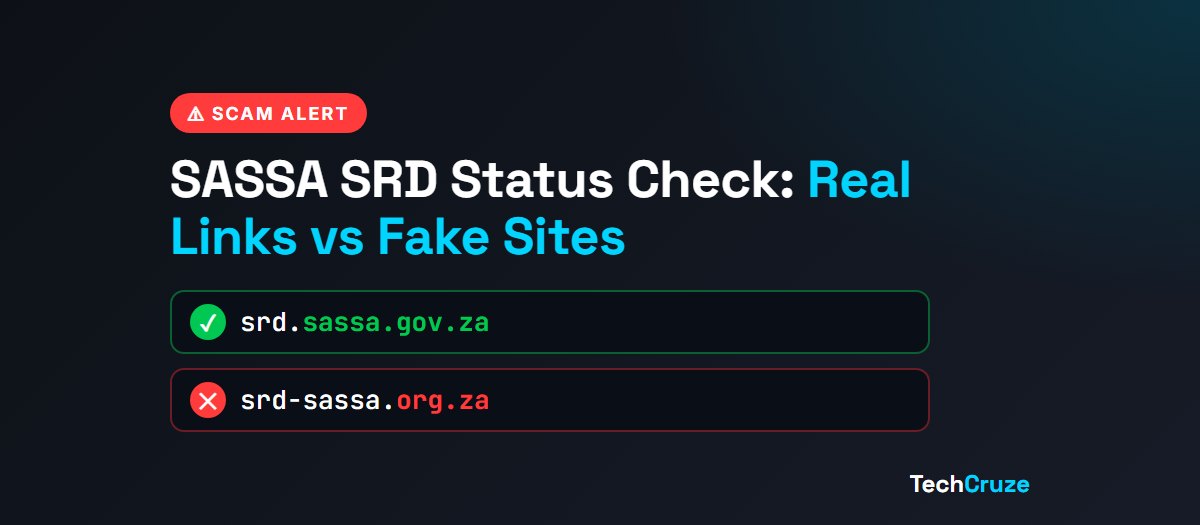
The only official SRD R370 status check site is srd.sassa.gov.za. Every real SASSA address ends in sassa.gov.za. Sites ending in .co.za, .org.za, .com or .org are not SASSA, even if “sassa” or “srd” is in the name. Type the address yourself rather than tapping links in SMSes.
Every month, millions of South Africans search for “SRD status check” or “SASSA status check” to see if their R370 grant was approved. Scammers know this. The search results and WhatsApp groups are full of lookalike sites, “free status checkers” and fake messages that want one thing: your ID number and phone number.
This guide shows you the real SASSA links, the fakes the government has already named, and a simple 30-second check that works on any link. We are not SASSA, and we don't collect any details. We just want you to get to the right place safely.
What Are the Official SASSA Links?
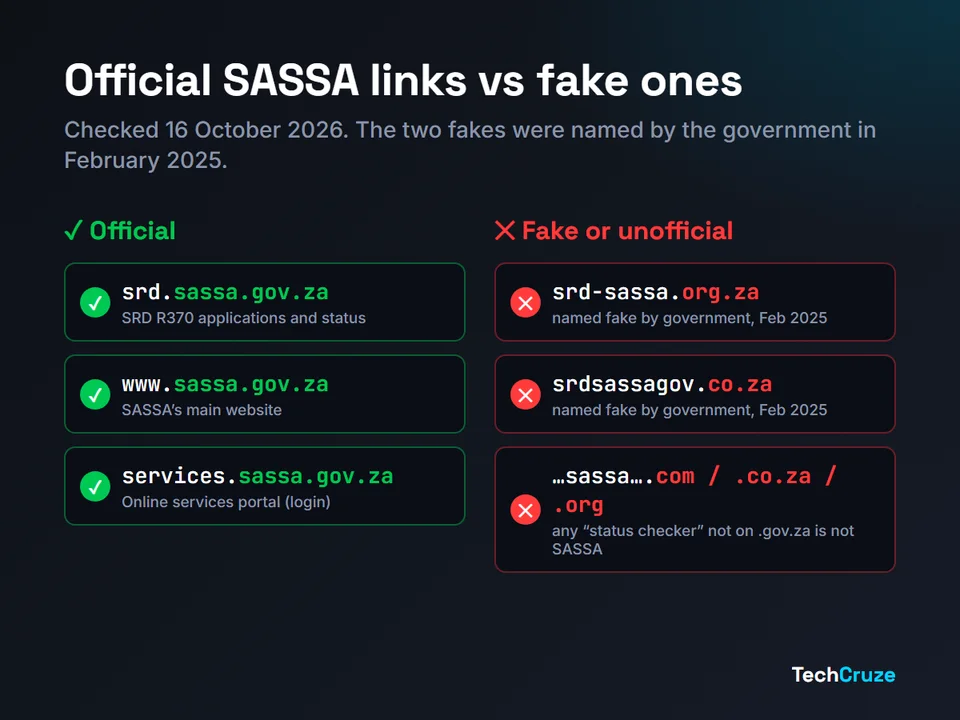
We checked these on 16 October 2026 against SASSA's own online services portal and the government's SAnews agency. Bookmark them, and use only these:
| What you want | Official address |
|---|---|
| SRD R370 grant: apply or check status | srd.sassa.gov.za |
| SASSA's main website (all grants, news, payment dates) | www.sassa.gov.za |
| SASSA online services portal (register and log in) | services.sassa.gov.za |
| SASSA toll-free helpline and fraud line | 0800 60 10 11 |
| SASSA grant enquiries by email | GrantsEnquiries@sassa.gov.za |
A couple of notes. SASSA says calls to 0800 60 10 11 are only free from a landline, so a cellphone call may cost you airtime. And if you're looking for the SRD appeals page, use the link on SASSA's official sites; any appeal page must also be on a .gov.za address.
We don't list WhatsApp numbers on purpose
Many websites list a “SASSA WhatsApp number”, but they don't agree on which number it is, and we couldn't confirm one from SASSA directly. Scammers also set up WhatsApp accounts with similar numbers. Only use a number you've found on sassa.gov.za itself.
How Do You Know a SASSA Link Is Real?
You don't need to be technical. Read the web address from the right-hand side, and ask two questions:
- Does it end in .gov.za? Only South African government bodies can use .gov.za addresses. If it ends in .co.za, .org.za, .com, .org or anything else, it's not SASSA.
- Is the word right before .gov.za exactly “sassa”? The part before that (srd, www, services) can change. The part right before .gov.za can't.
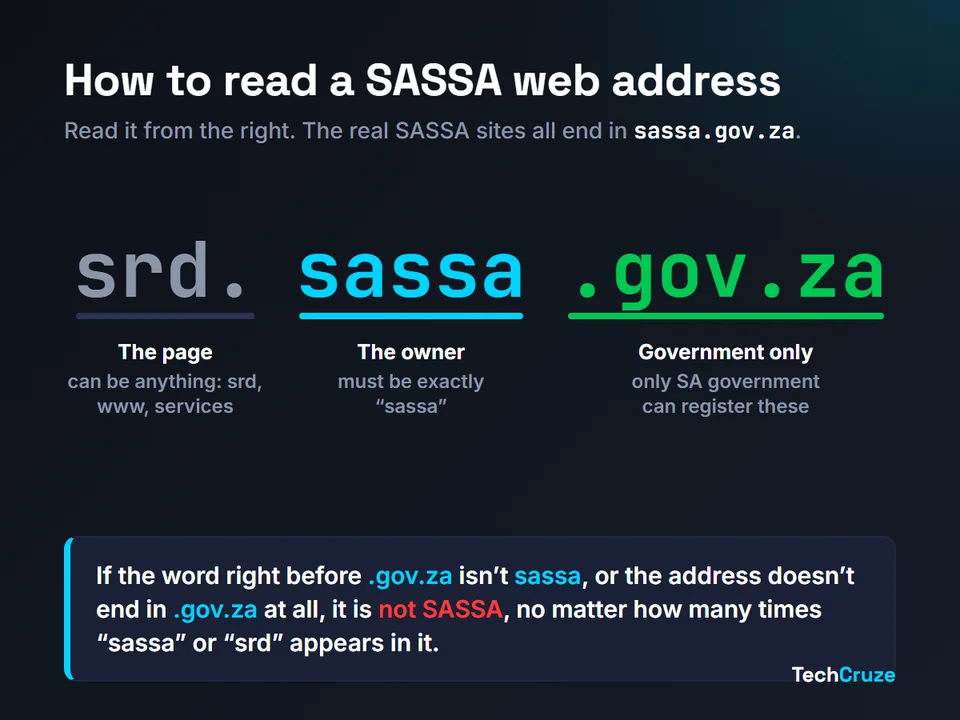
Scammers rely on you reading from the left. An address like “srd-sassa…” or “sassa-status-check…” starts with words that look right, but the ending gives it away. The same goes for misspellings like “sasa”, “sass” or “sdr”: if you search with a typo, be extra careful about which result you tap.
Which SASSA Sites Are Fake?
On 26 February 2025, the government told Parliament that malicious websites with .org and .co.za addresses were posing as the SRD application site. The government's news agency, SAnews, named two of them, srd-sassa.org.za and srdsassagov.co.za, and said they “are fake and are used to collect data from unsuspecting applicants” (SAnews).
The same report says SASSA planned to take down fake websites within 18 months. Until then, and because new ones can appear at any time, the safest rule is the one above: if it doesn't end in sassa.gov.za, don't enter anything.
Are SASSA Status Check Apps and Websites Safe?
If you search “SASSA status check” or “SRD status check online free”, many of the top results aren't SASSA. They're independent websites with names like “sassa-status”, “srd-check” or “sassacheck”, and some offer their own “status checker” box or app.
Some of these are simply guides that make money from adverts. Others may be worse. Either way, none of them is SASSA, and none of them can check your status any better than the official site. So:
- Never type your ID number and phone number into a status checker that isn't on sassa.gov.za. That's exactly the combination someone needs to try to take over your SRD application.
- Never pay to check your status. Checking on the official site doesn't cost anything.
- Be careful with “SASSA” apps. We couldn't confirm an official SASSA app for SRD status checks. An app that asks for your ID number, phone number or one-time PIN (OTP) is a risk, however official its logo looks.
Is That SASSA SMS or WhatsApp Real?
Fake SASSA messages usually follow the same script: your grant is “suspended” or “cancelled”, you must “verify your identity” urgently, and there's a link to tap. People search for an “SRD identity verification link” because messages like this tell them they need one.
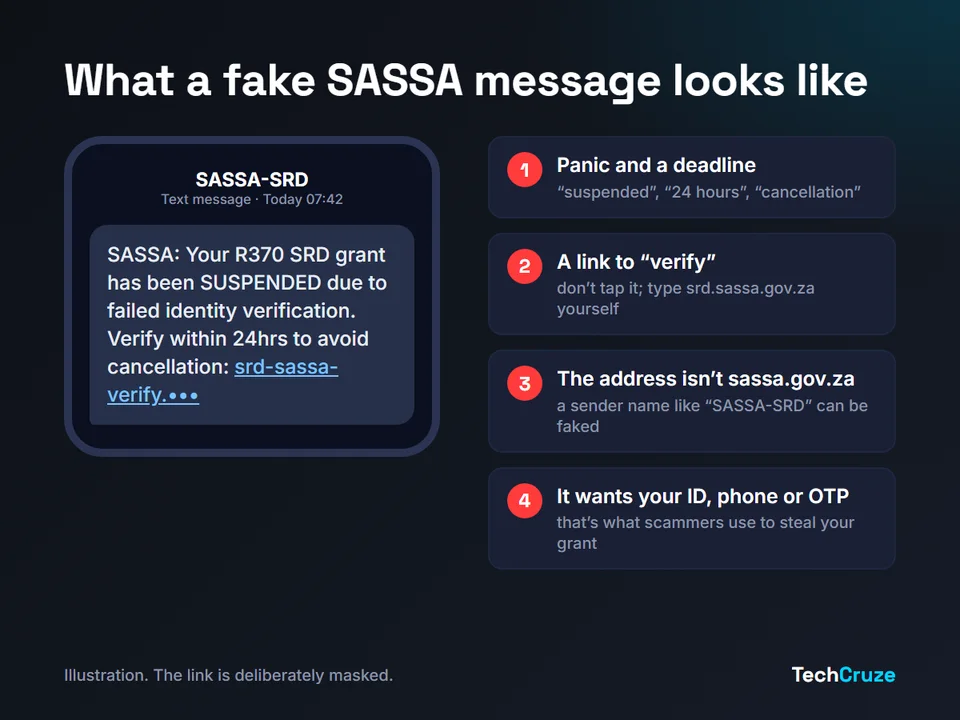
Here's how to handle any message about your grant:
Don't tap the link
Even if it looks right. A sender name like “SASSA” can be faked, and links can hide where they really go.
Go to the official site yourself
Open your browser, type srd.sassa.gov.za, and check your status there. If there really is a problem, you'll see it.
Never share an OTP
A one-time PIN sent to your phone is yours alone. Anyone asking you to read it back to them is trying to get into your account.
Check fake news before you share it
In August 2026, SASSA called a viral message claiming that people on betting sites would lose their grants “fake” and said it hadn't issued it (The Witness). Check SASSA's official channels before forwarding grant “news”.
The same tricks are used with bank messages. Our bank SMS and email checker shows real vs fake examples for every major SA bank.
What If You Entered Your Details on a Fake Site?
Don't panic, but act today:
- Check your SRD status on srd.sassa.gov.za to make sure nothing has changed, such as your payment method or banking details.
- Call SASSA on 0800 60 10 11 to report it. SASSA lists this as its grants and fraud hotline.
- If you gave banking details, call your bank now using the number on the back of your card.
- Consider Protective Registration with the Southern African Fraud Prevention Service (SAFPS). It's free and warns lenders to take extra care when someone applies for credit with your ID number.
- If money was stolen, open a case at SAPS and keep your case number.
If you've received an SMS asking you to confirm a SIM swap you didn't request, read our guide to SIM swap fraud, because a stolen phone number can be used to intercept your SRD OTPs.
FAQ
The official site for SRD R370 applications and status checks is srd.sassa.gov.za. SASSA's main website is www.sassa.gov.za and its online services portal is services.sassa.gov.za. All official SASSA addresses end in sassa.gov.za.
No. In February 2025 the government named srd-sassa.org.za and srdsassagov.co.za as fake sites used to collect data from unsuspecting applicants. The real SRD site is srd.sassa.gov.za.
We couldn't confirm an official SASSA app for SRD status checks. The safest way to check is to type srd.sassa.gov.za into your browser yourself. Treat any app or website that asks for your ID number and phone number to check your status as unofficial unless it is on sassa.gov.za.
Don't tap the link. Type srd.sassa.gov.za into your browser yourself and check your status there, or call SASSA on 0800 60 10 11. Messages that create panic and push you to a link are the most common way scammers steal ID numbers and grant payments.
Check your SRD status on srd.sassa.gov.za, report it to SASSA on 0800 60 10 11, and if you shared banking details, call your bank straight away. You can also apply for free Protective Registration with the Southern African Fraud Prevention Service (SAFPS) so lenders take extra care with your ID number.
Conclusion
Checking your SRD status should take a minute and cost nothing. The safest habit is also the simplest: type srd.sassa.gov.za yourself, every time, and ignore links in messages. If an address doesn't end in sassa.gov.za, it isn't SASSA, however convincing it looks.
🛡️ SASSA Link Safety Checklist
- Real SASSA addresses end in sassa.gov.za
- Type srd.sassa.gov.za yourself; don't tap links in SMSes or WhatsApp
- Never enter your ID and phone number on a third-party “status checker”
- Never pay to check your status, and never share an OTP
- Report suspicious messages to SASSA on 0800 60 10 11
TechCruze is an independent publication and is not affiliated with SASSA or the Department of Social Development. Official links and contact details were checked on 16 October 2026; always confirm on sassa.gov.za. If you spot an error, let us know.
Sources and Further Reading
- SASSA online services portal: Contact Us, the source of the toll-free number, email and main website address
- SAnews: Beware of fake COVID-19 SRD application sites (26 February 2025), which names the fake sites and srd.sassa.gov.za
- The Witness: SASSA warns public against fake grant cancellation message (4 August 2026)
- SAFPS: Protective Registration, which SAFPS says is free